CHAPTER I - INTRODUCTION
1.1 Document Purpose
This document describes the development of Moody’s second milestone, expanding the platform from a publicly accessible frontend into a fully interactive system equipped with authentication, role-based access control, a self-managed database, and a functional backend.
This milestone introduces structured interaction flows between three primary roles:
- Superadmin, who manages platform governance and user approval
- Psychologist, who publishes mental health resources and monitors patient mood trends. This behavior is intentionally designed to simulate a shared mental health monitoring environment where registered psychologists can observe anonymized emotional trends and patient journaling activity for educational and wellbeing support purposes.
- User/patient, who records daily moods and consumes wellness content
In addition, this report documents the platform architecture, database design, backend structure, interaction sequence diagrams, and the rationale behind the selected technologies and implementation decisions.
1.2 Topic Selection
Moody continues under the Health and Wellbeing theme established in the first milestone. The motivation behind the platform remains deeply personal. As an ITB student, I have experienced how academic pressure and highly competitive environments can gradually affect mental health until even important responsibilities begin to feel overwhelming.
Moody was designed to provide students with a private and accessible space where they can track their emotional condition daily through mood journaling. In this second milestone, the platform evolves further by introducing a psychologist role that allows mental health professionals to publish wellness articles, supportive resources, and guided content directly to users within the same platform.
The primary goal is to bridge personal emotional awareness with professional mental health support in a lightweight and accessible way without requiring users to leave the application ecosystem.
1.3 Platform Specification
Moody’s second milestone is built using the following technology stack:
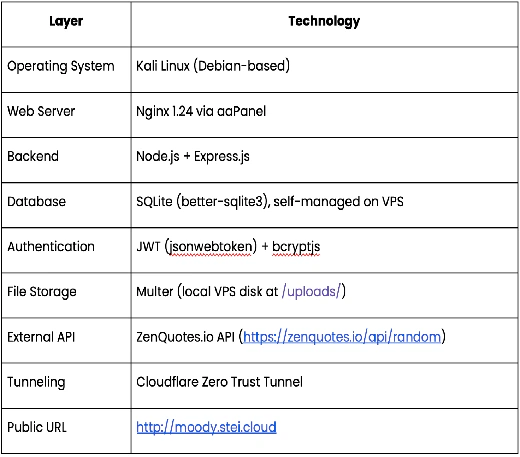
Table 1.3. Technology Stack
CHAPTER II - TASK SPECIFICATION
2.1 Platform Access
Moody implements a three-tier role system to ensure that each user can only access features relevant to their responsibilities.
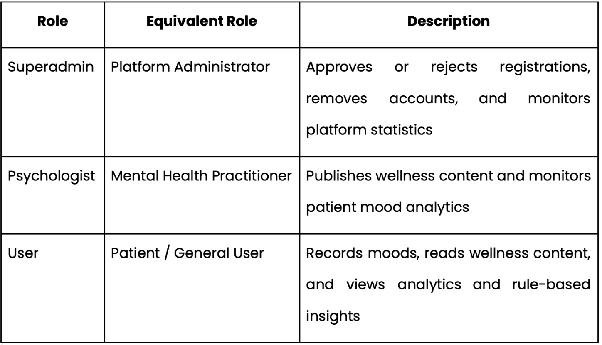
Table 2.1. Role System
Figure 2.1.1 shows the login interface used by all platform roles to authenticate into the system.
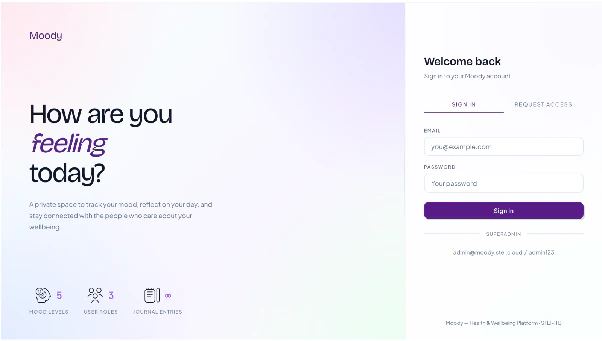
Figure 2.1.1. Moody Login Page
Account approval status is stored in the approved column with three possible states:
- 0 = Pending
- 1 = Approved
- 2 = Rejected
Figure 2.1.2 illustrates the registration interface where users may create accounts and optionally upload profile avatars before awaiting superadmin approval.
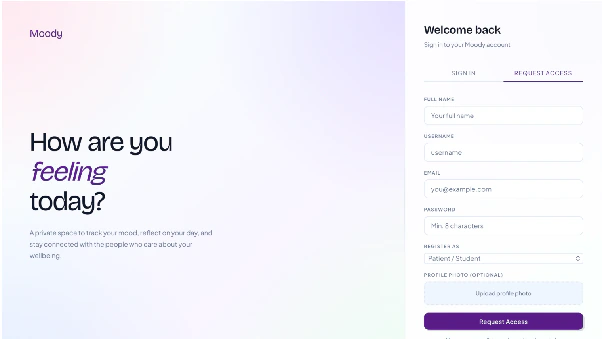
Figure 2.1.2. Moody Registration Page
Users whose accounts are rejected receive a specific rejection message during login, while pending users are informed that their account is still under review.
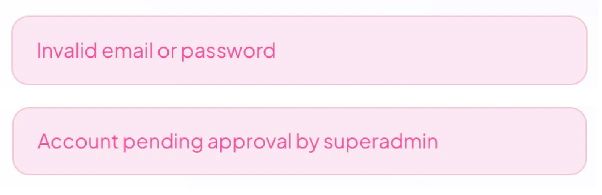
Figure 2.1.3. Moody Login Validation Message
Administrative moderation and platform monitoring are handled through dedicated backend endpoints such as /api/admin/pending for reviewing pending registrations and /api/admin/stats for retrieving aggregated platform statistics.
Figure 2.1.4 presents the superadmin dashboard used to review pending registrations and monitor overall platform statistics.
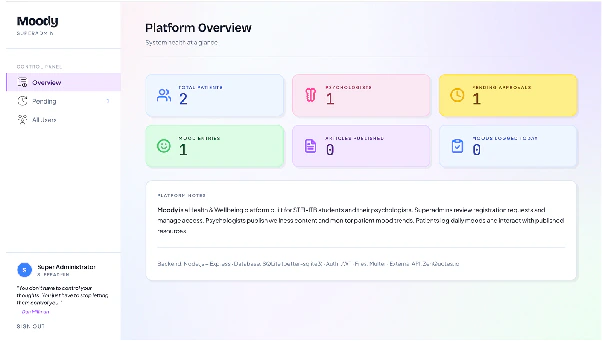
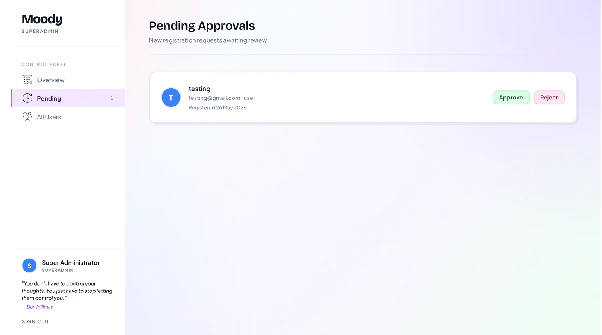
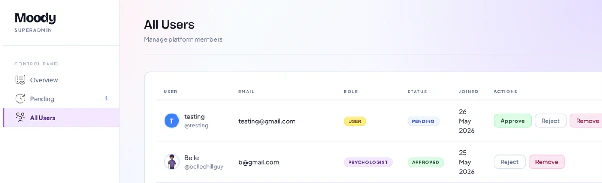
Figure 2.1.4. Superadmin Dashboard and User Approval Interface
The seeded superadmin account is:
- Email: [redacted]
- Password: [redacted]
2.2 Data Storage, Database, and Backend
2.2.1 Backend Architecture
The backend is developed using Node.js and Express.js and organized into five route groups mounted through server.js:
/api/authfor registration, login, and profile management/api/moodsfor mood logging, retrieval, and analytics/api/contentfor wellness content management/api/adminfor administrative actions and user approval/api/quotefor communication with the external ZenQuotes.io API
Authentication and authorization are enforced through middleware-based access control using requireAuth and requireRole(role) guards on protected endpoints. These middleware layers ensure that only authenticated users with the appropriate role permissions can access restricted platform functionalities.
The backend also serves the static frontend from the /frontend directory and uses an SPA fallback mechanism that redirects unknown routes to index.html.
Figure 2.2.1 illustrates the overall deployment and infrastructure architecture of the Moody platform, including Docker containerization, persistent storage volumes, Cloudflare tunneling, and external API integration.
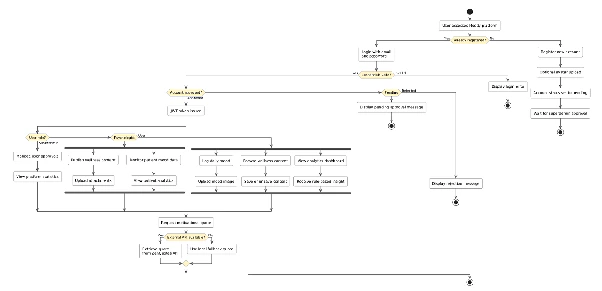
Figure 2.2.1. Moody System Architecture Diagram
2.2.2 Database
During containerized deployment, the SQLite database is mounted at /app/data/moody.db through a Docker volume to ensure persistence across container restarts.
The database operates in WAL mode to improve concurrent read performance while foreign key constraints remain enabled for relational consistency.
2.2.2.1 users
Stores all registered platform accounts.
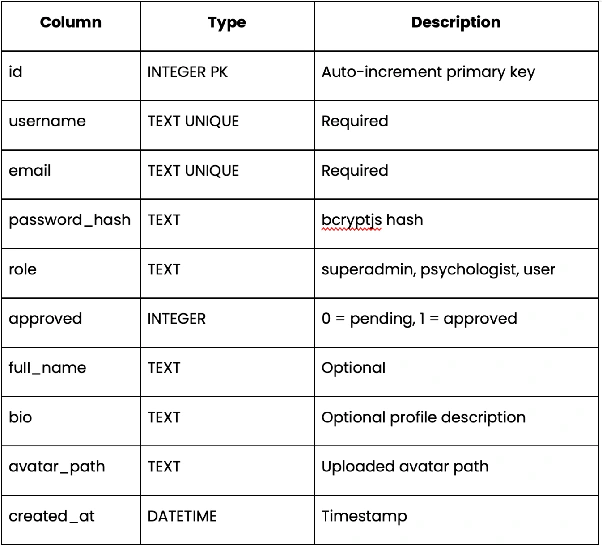
Table 2.2.1. users Data Type
Figure 2.2.2.1 presents the SQLite database structure of users used by the platform during deployment and runtime.
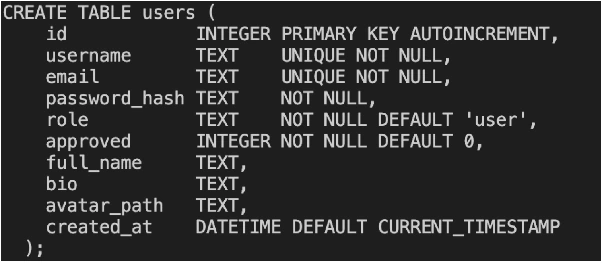
Figure 2.2.2.1. SQLite Users Structure Preview
2.2.2.2 mood_entries
Stores daily mood journals submitted by users.
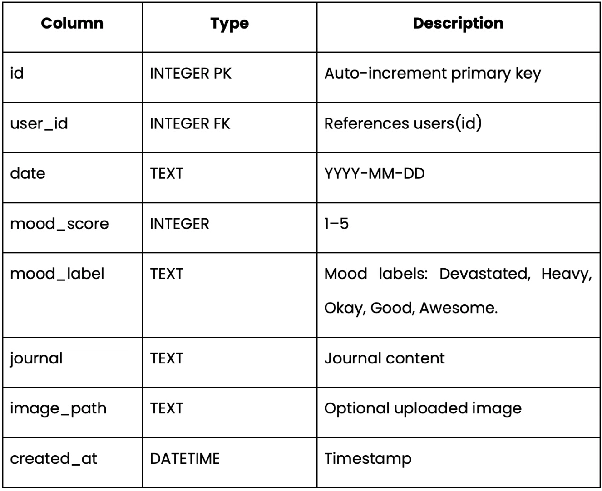
Table 2.2.2. mood_entries Data Type
Figure 2.2.2.2 presents the SQLite database structure of mood_entries used by the platform during deployment and runtime.
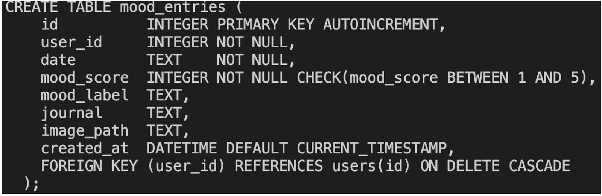
Figure 2.2.2.2. SQLite mood_entries Structure Preview
2.2.2.3 content
Stores wellness content published by psychologists.
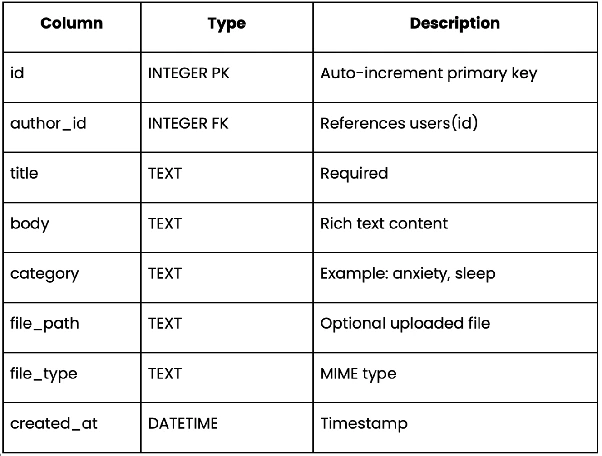
Table 2.2.3. content Data Type
Figure 2.2.2.3 presents the SQLite database structure of content used by the platform during deployment and runtime.
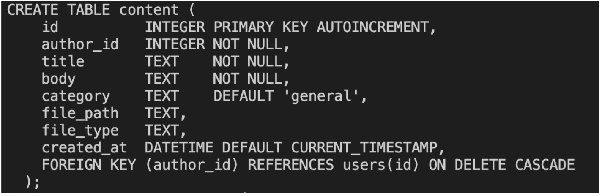
Figure 2.2.2.3. SQLite content Structure Preview
2.2.2.4 content_saves
Tracks bookmarked content.
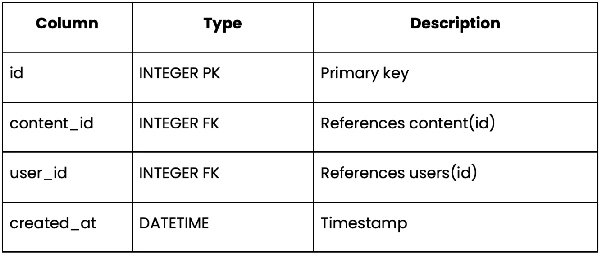
Table 2.2.4. content_saves Data Type
Figure 2.2.2.4 presents the SQLite database structure of content_saves used by the platform during deployment and runtime.
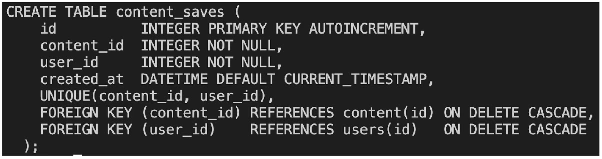
Figure 2.2.2.4. SQLite content_saves Structure Preview
2.2.2.5 Supported File Formats
File uploads are handled using Multer middleware and stored locally inside the VPS through Docker-mounted persistent volumes.
Mood journal uploads only accept image formats including JPEG, PNG, GIF, and WebP. Avatar uploads accept general image MIME types through file.mimetype.startsWith('image/') validation.
Psychologist content attachments are more flexible and support broader file formats without strict MIME type restrictions, allowing psychologists to upload supporting wellness resources and documents more freely.
Uploaded files are persisted through the moody-uploads Docker volume to ensure data remains available across container restarts and redeployments.
2.3 Interaction Flows
Two primary interaction flows exist between psychologists and users.
2.3.1 Flow 1: Psychologist Publishes Content → User Reads and Saves Content
- Psychologist submits content through
/api/content - Authentication and role validation are performed.
- Optional file uploads are processed through Multer.
- Content is inserted into the database.
- Users retrieve the content feed through
/api/content. - Users may bookmark content through
/api/content/:id/save.
Figure 2.3.1 illustrates the interaction sequence between psychologists and users during content publishing, browsing, and bookmarking activities.
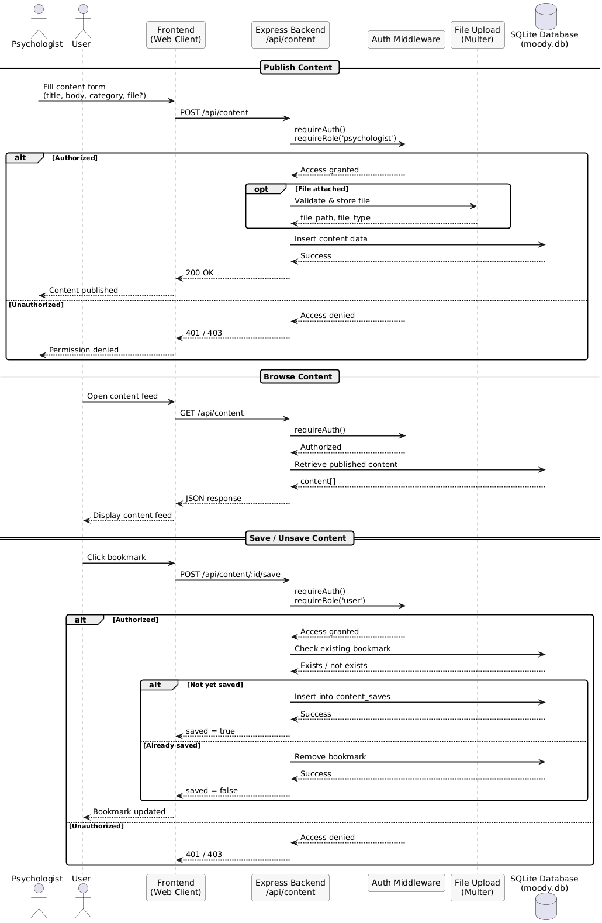
Figure 2.3.1. Interaction Flow Between Psychologist and User
Figure 2.3.2 shows the interface used by psychologists to publish wellness content and upload supporting attachments.
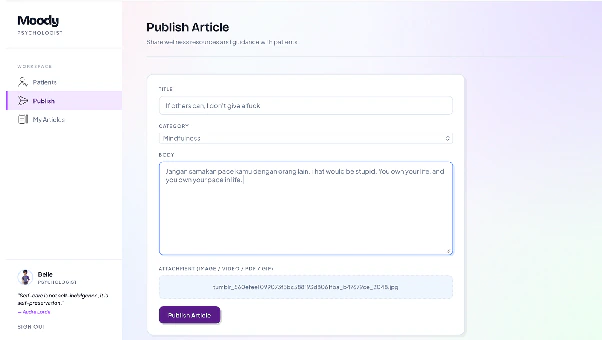
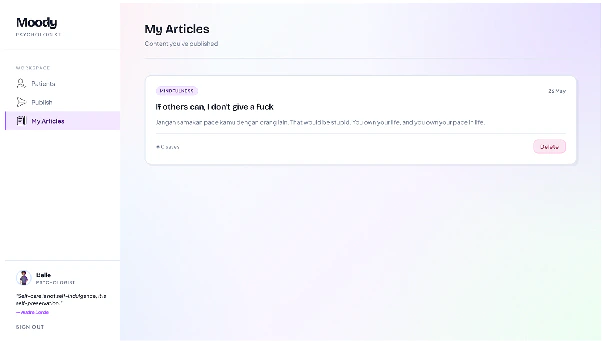
Figure 2.3.2. Psychologist Content Publishing Interface
Figure 2.3.3 presents the user content feed interface with bookmarking functionality.
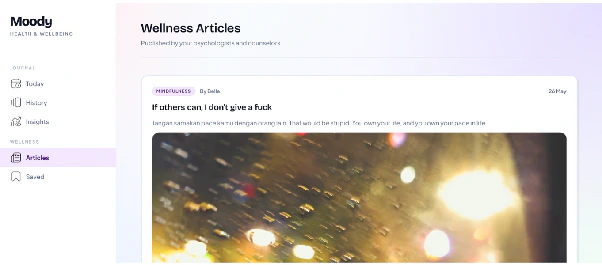

Figure 2.3.3. User Content Feed and Bookmark Feature
2.3.2 Flow 2: User Logs Daily Mood and Receives Rule-Based Insight
- User submits a mood entry through
/api/moods. - Authentication and role validation are performed.
- Optional image uploads are processed.
- Existing entries for the same date are updated instead of duplicated.
- Mood analytics are generated through
/api/moods/stats. - The system calculates mood averages and generates rule-based insights.
The platform uses the following mood labels:
- Devastated (1)
- Heavy (2)
- Okay (3)
- Good (4)
- Awesome (5)
Insight generation rules:
- Average < 2.5 → supportive concern message
- Average ≥ 4.2 → positive reinforcement message
- Average ≥ 3.0 → neutral encouragement message
Insights are only generated if at least three entries exist within the past seven days.
Figure 2.3.4 illustrates the complete interaction flow for mood logging, image upload validation, database persistence, and rule-based insight generation.
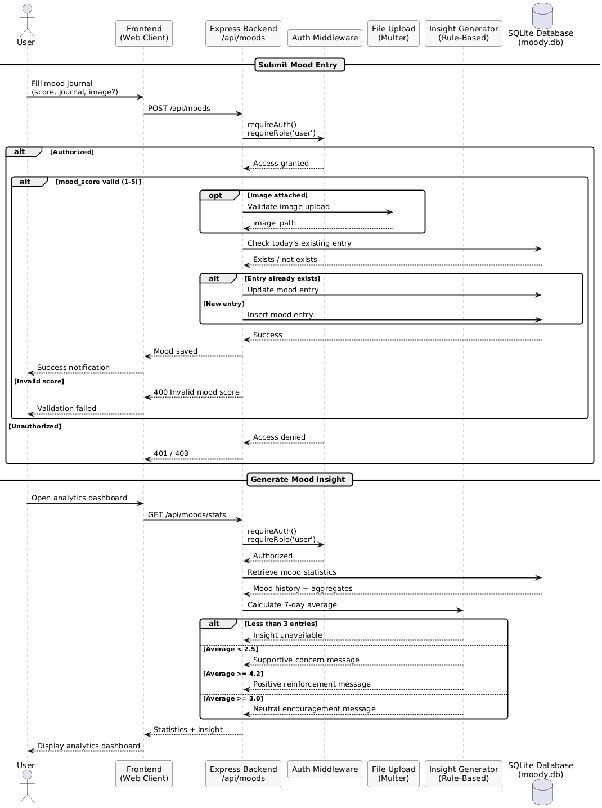
Figure 2.3.4. Mood Logging and Rule-Based Insight Flow
Figure 2.3.5 shows the daily mood journaling interface used by users to record emotional conditions and upload optional images.
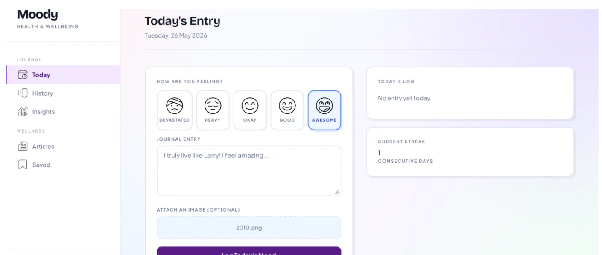
Figure 2.3.5. Daily Mood Journaling Interface
Figure 2.3.6 presents the analytics dashboard displaying mood statistics and generated rule-based insights.
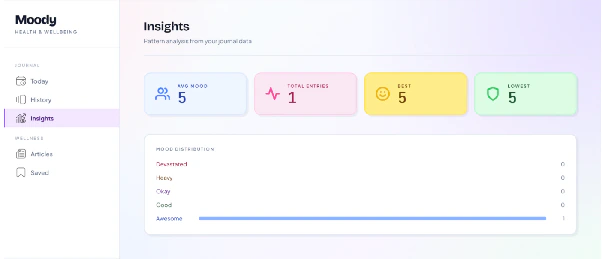
Figure 2.3.6. Mood Analytics and Insight Dashboard
2.3.3 Flow 3: Psychologist Monitors Patient Mood Data
Psychologists can monitor aggregated mood analytics from all approved users without requiring patients to manually report their emotional conditions.
Endpoints used:
/api/moods/patients/api/moods/patient/:id
This functionality transforms Moody from a simple journaling platform into a lightweight mental health monitoring system that supports more contextual and data-driven consultations.
Figure 2.3.7 illustrates how psychologists retrieve aggregated patient mood statistics and detailed emotional history from the backend system.
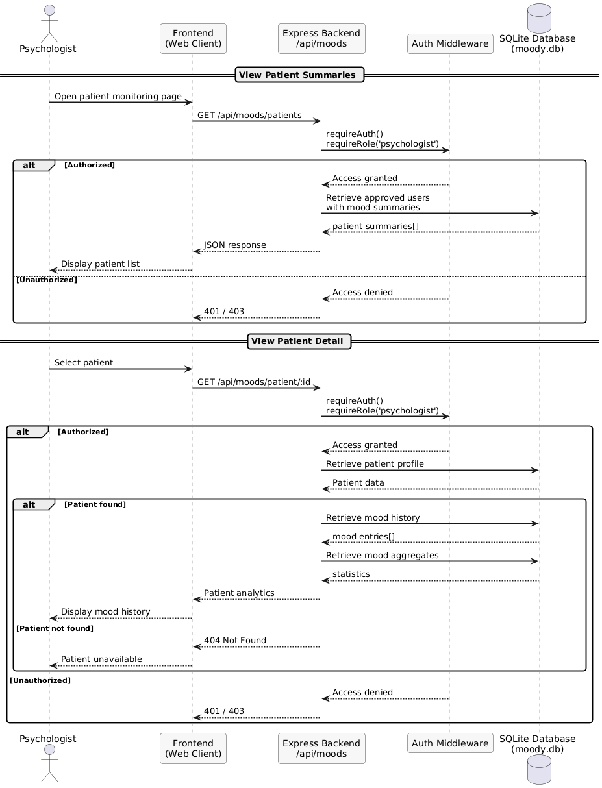
Figure 2.3.7. Psychologist Patient Monitoring Flow
Figure 2.3.8 shows the patient monitoring dashboard used by psychologists to observe user mood summaries and recent activity.
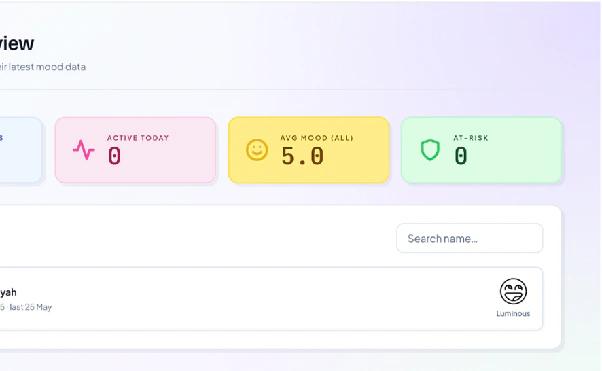
Figure 2.3.8. Patient Monitoring Dashboard
Figure 2.3.9 presents the detailed patient analytics page containing historical mood records and statistical summaries.

Figure 2.3.9. Patient Mood Detail Interface
2.4 Platform Functionalities
The platform’s core functionalities are summarized below.
Figure 2.4.1 presents the primary system flow of Moody, beginning from authentication and approval processes to role-based interaction within the platform.
Figure 2.4.1. Main Platform System Flow
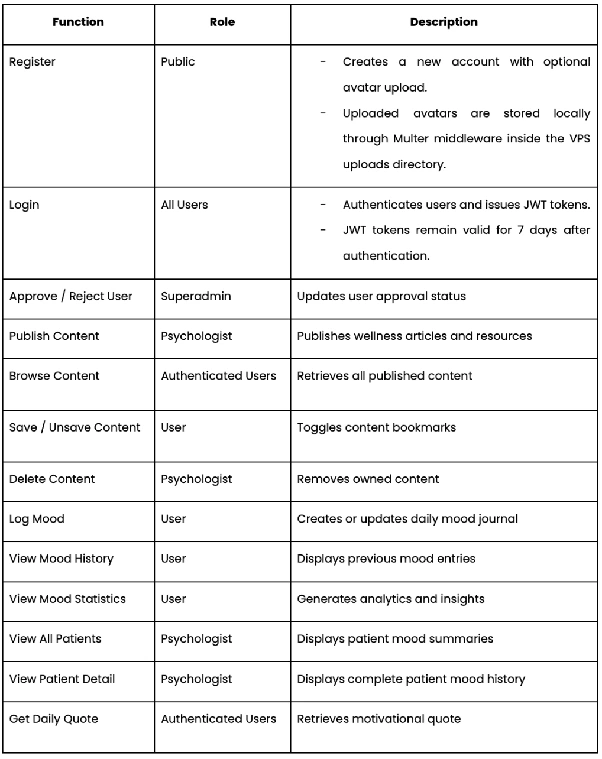
Table 2.4.1. Platform Functionalities
In addition to the public content feed, psychologists may also access a personalized content management endpoint through /api/content/mine to retrieve and manage content that they have personally published.
2.5 Platform Distinctiveness
Moody combines personal mood intelligence with professional mental health support inside a lightweight and accessible platform specifically designed for students.
2.5.1 Psychologist Dashboard with Real-Time Mood Monitoring
Moody allows registered psychologists to access aggregated patient mood data in real time, including average mood scores, recent entries, and historical trends.
This creates a more meaningful connection between personal journaling and professional mental health support while enabling psychologists to better understand patient conditions before consultations occur.
Figure 2.5.1 shows the real-time patient monitoring capability available to psychologist accounts.

Figure 2.5.1. Psychologist Dashboard with Real-Time Mood Monitoring
2.5.2 Rule-Based Insight System
The analytics dashboard generates supportive insights based on the user’s average mood within the past seven days.
Unlike platforms that depend on external AI APIs, Moody processes all insight generation internally through lightweight rule-based logic, maintaining both privacy and efficiency.
2.5.3 Empathetic Mood Labels and Image Journaling
Instead of relying solely on numerical scales, Moody uses emotionally expressive labels such as Devastated, Heavy, Okay, Good, and Awesome.
Users may also attach images to mood journals, making the journaling process more personal and emotionally reflective.
Supported image formats include:
- JPEG
- PNG
- GIF
- WebP
Maximum upload size: 10 MB.
Figure 2.5.2 illustrates the mood selection interface using emotionally expressive labels rather than purely numerical scales.
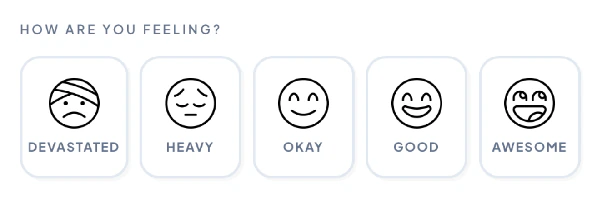
Figure 2.5.2. Empathetic Mood Label Design
2.5.4 ZenQuotes.io API with Local Fallback
Each session begins with a motivational quote retrieved from the ZenQuotes.io API.
If the external API fails or times out, the backend automatically switches to six locally curated motivational quotes stored directly within the server to ensure service consistency.
Figure 2.5.3 shows the motivational quote component displayed on the platform dashboard through ZenQuotes API integration.

Figure 2.5.3. Motivational Quote Integration
2.6 Bonus: Dockerization
Moody is packaged inside a single Docker container named moody-app using Node.js 20 Alpine as a lightweight base image.
Two named Docker volumes are used:
- moody-db for SQLite database persistence
- moody-uploads for uploaded files persistence
Figure 2.6.1 shows the persistent Docker volumes used for SQLite database and uploaded file storage.

Figure 2.6.1. Docker Persistent Volumes
This approach ensures that uploaded files and database contents remain persistent even if the container is rebuilt or restarted.
2.6.1 Container Components
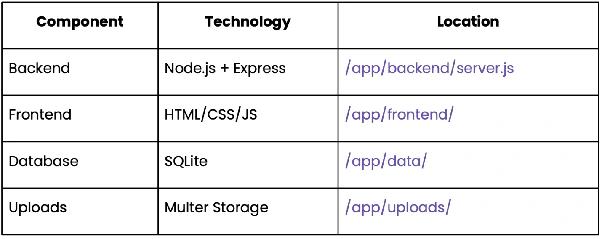
Table 2.6.1. Container Components
2.6.2 Dockerfile Logic
The container rebuilds better-sqlite3 directly inside the Linux environment using tools such as python3, make, and g++ because native binaries compiled on macOS are not compatible with Alpine Linux containers, requiring native compilation during the image build process.
This rebuild process prevents architecture-related runtime issues and ensures deployment consistency across environments.
Without Docker, deployment would require manual installation of Node.js, native build tools, dependency management, and environment configuration. Docker Compose simplifies deployment into a single command:
docker compose up -d
Figure 2.6.2 presents the running Moody container during deployment inside the VPS environment.

Figure 2.6.2. Docker Container Deployment
This approach also eliminates common environment inconsistency problems such as “works on my machine” scenarios.
Figure 2.6.3 presents the publicly accessible Moody deployment hosted through aaPanel and Cloudflare tunneling.
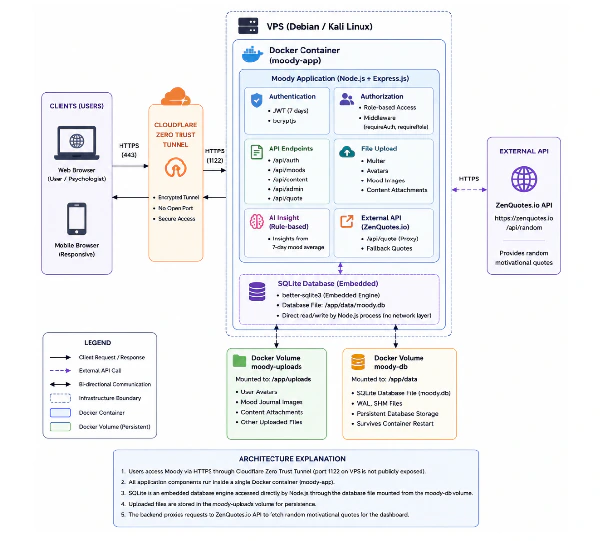
Figure 2.6.3. Public VPS Deployment Environment
CHAPTER III - SUBMISSION DETAILS
3.1 Submission Checklist
Public Platform Link:
Figure 3.1 presents the publicly accessible Moody platform.
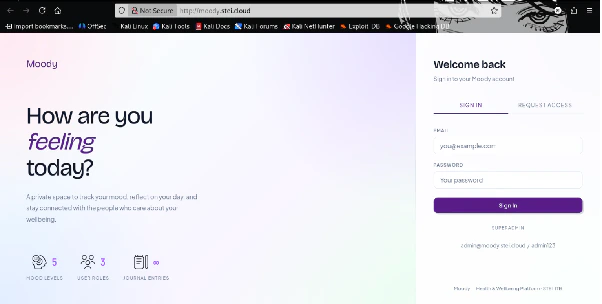
Figure 3.1. Public Platform Screenshot
REFERENCES
A. A. Arman and D. W. Anggara, “VPS Server Setup,” ITB Lecture Materials, Bandung, 2026.
A. A. Arman, “Cloud Computing Technologies,” ITB Lecture Materials, Bandung, 2026.
D. Olteanu, “SQLite WAL Mode,” SQLite Documentation. Available: https://www.sqlite.org/wal.html
Express.js Contributors, “Express.js Documentation.” Available: https://expressjs.com/
Auth0, “Introduction to JSON Web Tokens.” Available: https://jwt.io/introduction
APPENDIX
GitHub Source Code
https://github.com/bellechillguy/Mood-Tracking-Platform-with-VPS-Based-Deployment--Moody-