In this challenge, we were given the server address (nc 34.50.98.72 8911) and a .pcapng file. To access this file, Wireshark is required. Within the server, there are three questions.
I. First Question
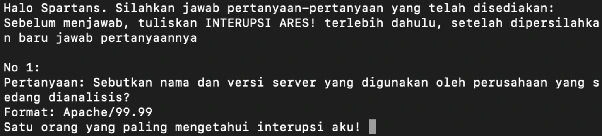
The way to solve this is to open any file, right-click it, and select Follow. This will take you to information about the server’s name and version.
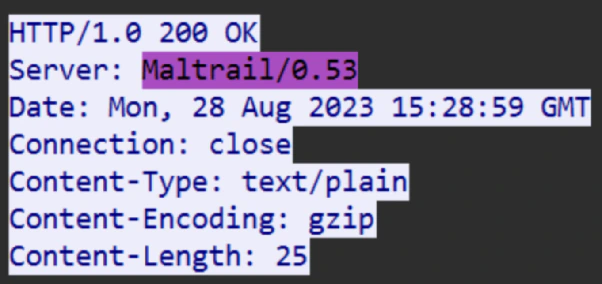
Answer: Maltrail/0.53
II. Second Question

The way to solve this is to filter all requests based on the information to make it easier, then look for the one with the information POST:login, then select the second attempt that says login success.
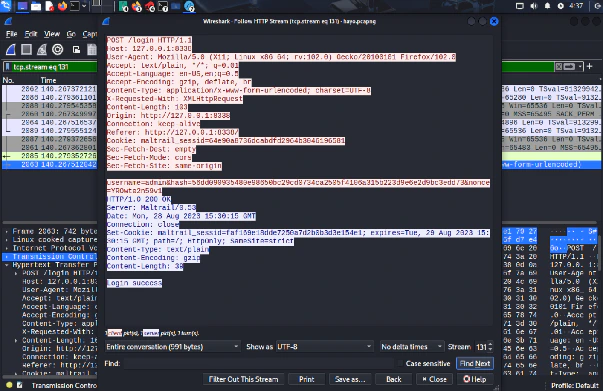
Answer: admin/56dd09…
III. Third Question

Look for a POST:LOGIN attempt, but one that uses the ECHO command.
Then, you’ll find a username containing Base64-encoded text.
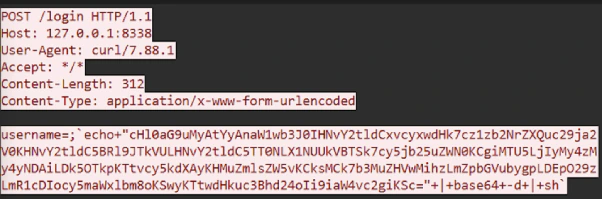
Therefore, I did a decoder so that I got information related to the question.

Answer: 159.223.33.240:9999
IV. Closing Question

With the IP and port information gathered, we simply search for attempts from the same source. After selecting Follow, we find the file stored by the hacker as follows:
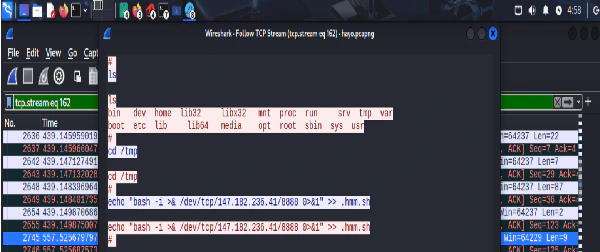
Answer: /tmp/.hmm.sh
V. Flag
Finally, after all the questions are answered, we get the flag.

SPARTA{pretty_much_99%_of_packet_capture_challs_is_like_this_4cd830d1cd9921d5}